Your EU OSS return, built from your Shopify orders.
Shopify charges the VAT but has no report for the return. VATquarter turns your orders and refunds into the rows the OSS portal asks for: taxable amount and VAT by country and rate, in euros. You review and file; Pro adds the download.
The full return on screen is free for up to 100 orders a period, no card needed. Exports and unlimited orders are $9 a month after a 14-day trial, billed through Shopify.
OSS return Union scheme
Q4 2026
| From | ConsumptionTo | Rate | Taxable EUR | VAT EUR |
|---|---|---|---|---|
| DE | AT Austria | 20% standard | 92.15 | 18.43 |
| DE | AT Austria | 10% reduced | 17.55 | 1.76 |
| DE | BE Belgium | 21% standard | 136.04 | 28.57 |
| DE | ES Spain | 19% unrecognised | 87.77 | 16.68 |
| DE | FR France | 20% standard | 231.05 | 46.20 |
| DE | FR France | 5.5% reduced | 35.11 | 1.93 |
| DE | IT Italy | 22% standard | 276.46 | 60.82 |
| DE | NL Netherlands | 21% standard | 92.15 | 19.35 |
| Supplies | 968.28 | 193.74 | ||
| Correction to Q3 2026, FR 20% (1 refund) | −44.03 | −8.81 | ||
| Net VAT due | 184.93 | |||
Example figures from a demo store, laid out as the app reports them. “Unrecognised” marks a rate that is not a VAT rate of the customer’s country.
31January 2027
The Q4 2026 OSS return is due on 31 January.
It covers sales from 1 October to 31 December 2026, so it carries the whole holiday season. The 31st is a Sunday, and the OSS deadline does not move for weekends. The December IOSS return is due the same day.
Shopify charges the VAT. Nobody hands you the return.
Sell to EU consumers above the €10,000 threshold and you file an OSS return every quarter, with VAT split by destination country and rate. Shopify has no report in that shape. VATquarter builds it from the orders and refunds already in your store. These are screens from the app.
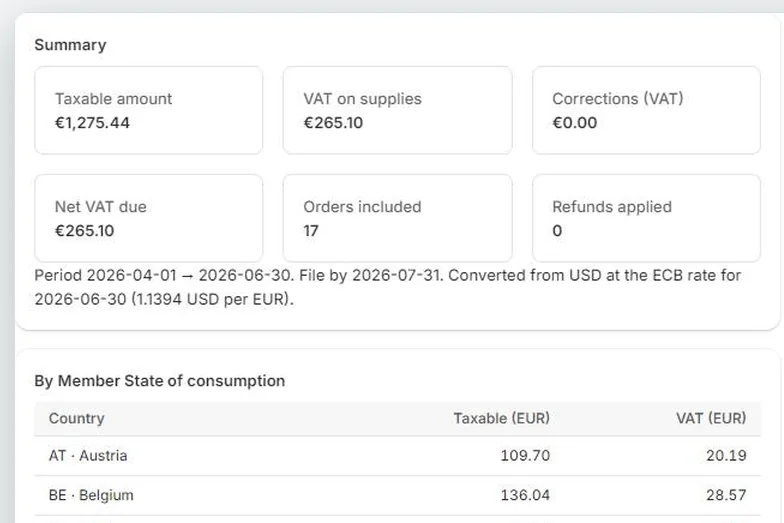
The return, in the layout of the form
Taxable amount and VAT per Member State of consumption and rate, split by the country the goods were dispatched from. Non-euro stores are converted at the ECB rate for the last day of the period, and the rate is printed on the report.
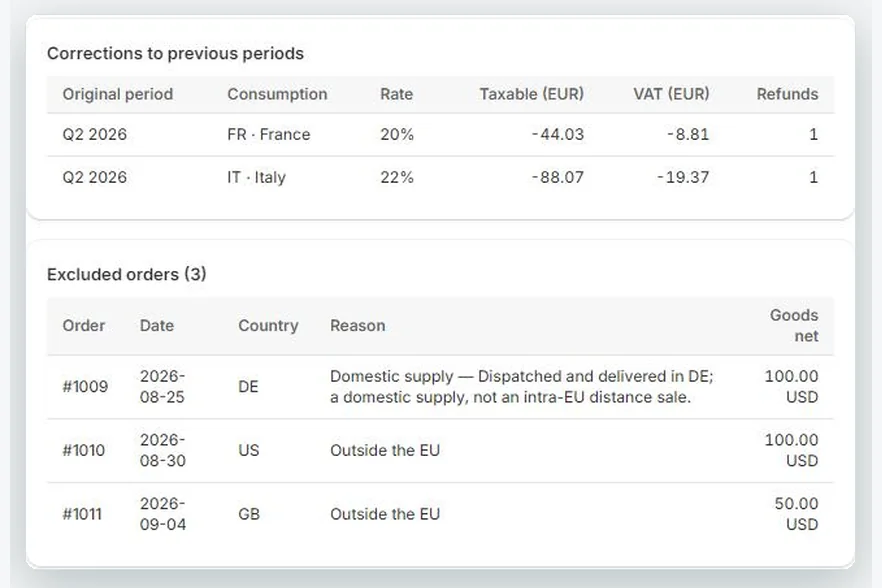
Refunds of earlier quarters, as corrections
A refund issued this quarter for an order from last quarter belongs in this return as a correction to that period. It is listed that way, and every order left out of the return says why.
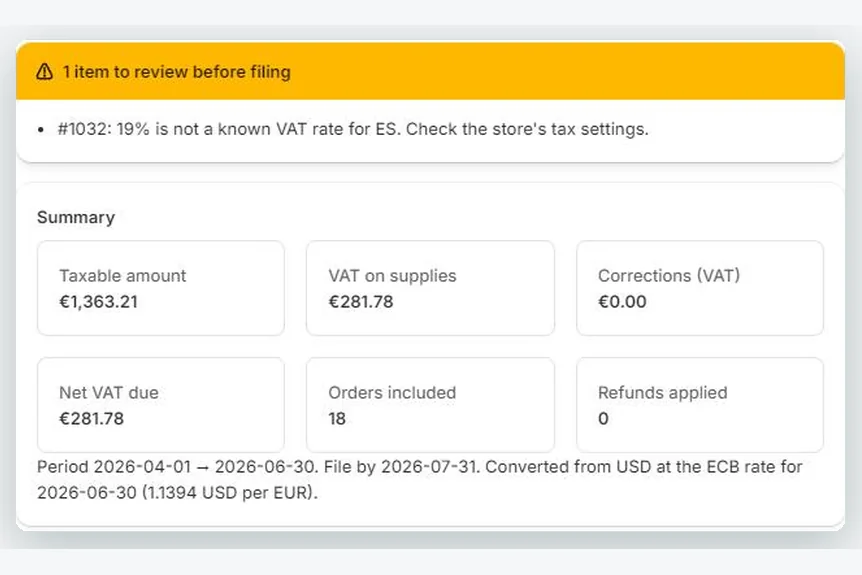
Wrong rates flagged before you file
Every charged rate is checked against the destination country. A German 19% on an order to Spain shows up as a warning with the order number, so you can fix the tax settings instead of filing the mistake.
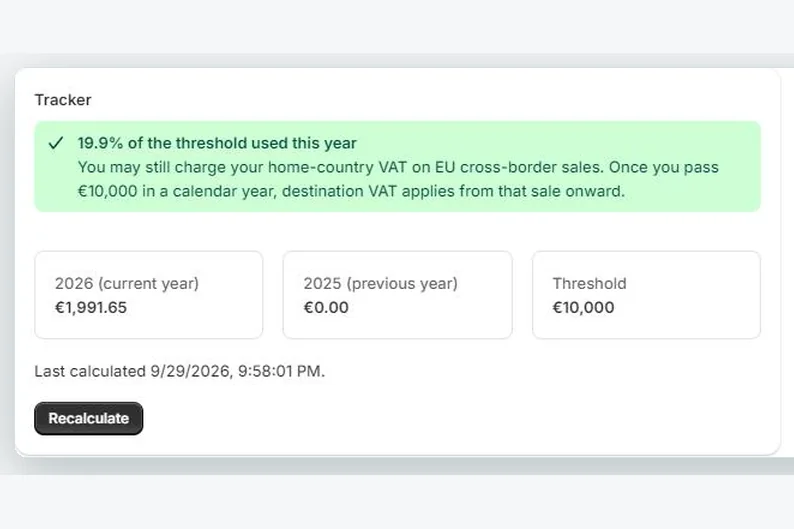
The €10,000 threshold, tracked
Cross-border B2C sales for this calendar year and last, so you know whether destination VAT applies to you yet.
- IOSS, monthly. Shipping into the EU from outside it in consignments up to €150? The IOSS report (on Pro) runs per month and leaves out consignments over the ceiling.
- Every euro traced. The audit sheet in the Pro export lists each order and refund with its country, rate and amounts, ready for your accountant or an audit.
- Read-only. VATquarter adds up the VAT Shopify charged. It never recalculates tax, changes your tax settings or files anything.
Three steps, once a quarter.
The app starts from your store address, so there is little to set up. After that a return is one click and a review.
Check where you file
In Settings, check the EU country where you are registered for OSS and the country your goods usually ship from. Orders shipped from a Shopify location in another country use that location automatically.
Build the return
Choose the quarter for OSS, or on Pro a month for IOSS. VATquarter reads the orders and refunds through Shopify’s bulk export, so large stores work too.
Review and file
Read the items to review and enter the rows in your tax authority’s OSS portal. On Pro, download the XLSX and keep its audit sheet with your records.
For the people who file the return.
Shopify merchants
- EU-based stores selling to consumers in other Member States and filing OSS each quarter.
- Stores outside the EU shipping consignments up to €150 under IOSS each month (Pro).
- Stores still under €10,000 of cross-border sales that want to see the threshold coming.
Accountants and bookkeepers
- Figures your client can produce themselves, in the layout you file from.
- A per-order audit sheet and an excluded-orders sheet with the reason for each, in the Pro export.
- The rules the app applies are listed below with their articles, so you can check each one.
The rules it applies, with their articles.
VATquarter never recalculates tax. It adds up what Shopify charged and applies these rules from the VAT Directive (2006/112/EC). Your accountant can check every one.
| Rule | How VATquarter applies it | Source |
|---|---|---|
| Member State of consumption | The delivery address. Monaco is reported as France and Northern Ireland as XI for goods. The Canary Islands, Ceuta, Melilla and Åland are outside the EU VAT area and are excluded. | Art. 33, Windsor Framework |
| Union scheme (OSS) | Goods dispatched from one Member State to a consumer in a different one. Domestic supplies are excluded. B2B orders are excluded when no VAT was charged; if VAT was charged, the order is included and flagged for you to check. | Art. 14(4), 369a–369k, 203 |
| Import scheme (IOSS) | Goods dispatched from outside the EU in consignments whose intrinsic value (goods, net of VAT and shipping) is at most €150. | Art. 369l–369x |
| Currency | Amounts in euro at the ECB rate for the last day of the period, or the next day a rate is published. | Art. 369h(2), 369u(2) |
| Corrections | Changes to an earlier period go in a later return, identified by Member State and period, within three years of the date the original return was due. | Art. 369g(4), 369t(2) |
| €10,000 threshold | For businesses established in one Member State: cross-border B2C goods in the current and previous calendar year. | Art. 59c |
The return is free to see. Pay when you want the file.
Two plans. Prices in US dollars, billed through Shopify on your regular invoice. Pro starts with a 14-day free trial. Cancel any time inside the app.
Free
$0
No card, no time limit
- The complete return on screen: every country and rate row
- Corrections for refunds of earlier quarters
- Orders left out, each with the reason
- Warnings, including wrong-rate checks
- The latest completed quarter and the current one
- €10,000 threshold tracker
For returns with up to 100 in-scope orders a period. Above that, Free shows the totals and the VAT per country.
Install freePro For filing every quarter
$9 a month
or $79 a year · 14-day free trial
- Everything in Free, with unlimited orders
- XLSX and CSV export with a per-order audit sheet
- Earlier periods
- IOSS monthly returns
- Rows split by dispatch country, for stores with more than one warehouse
Prepare OSS returns for Shopify clients? Get a practice account.
Merchants can simply install the app. If you prepare returns or build stores for clients, tell us about your practice. We’ll set up a free Pro account for your own use and a code your clients can enter in the app for a longer trial. One reply, within a business day.
Guides to OSS and IOSS on Shopify.
Written for merchants who file their own return and the accountants who check it. Free to read, no sign-up.
- Does the €3 customs duty go in my IOSS return?
Since July 2026 low-value parcels into the EU carry a €3 customs duty per item (each kind of product, not each unit), and since November a €2 handling fee. Whether they belong in your IOSS figures depends on one thing: whether you charged them to the customer.
- The IOSS €150 limit is going (scheduled for 1 July 2028)
On 9 November 2026 the Council agreed to remove the €150 ceiling from the Import One-Stop Shop. What changes for Shopify sellers in 2028, and what stays exactly as it is until then.
- IOSS vs OSS for Shopify stores
Which EU VAT scheme applies to your Shopify store depends on where goods ship from and what they’re worth. A plain guide with examples.
- How to prepare your OSS return from Shopify
A step-by-step guide to turning Shopify orders into the quarterly EU OSS return, with the rules on country, rate, refunds and currency.
- Shopify’s EU VAT report and what it’s missing
What Shopify’s built-in tax reports give an EU merchant, what the OSS return needs, and how to bridge the gap.
Questions before you install.
More detail on every column and warning is in the help pages.
Does VATquarter file the return for me?
Does it change my tax settings or recalculate VAT?
What does the Free plan include?
What does Pro add, and what does it cost?
What if my store isn’t in euros?
How are refunds handled?
What data does the app store?
I sell B2B as well. Are those orders included?
Is this tax advice?
Have the Q4 figures ready before 31 January.
Install on the Free plan and see the full return for the quarter, row by row. Upgrade only if you need the export, earlier periods or more than 100 orders.